本主题,基于 Jekyll 3.4.3 版本进行开发的。适用于任何以 HTML 为前端的博客系统。
Bootstrap v4.0.0-alpha.6、jQuery v1.11.3 版本,作为 HTML、CSS 和 JS 框架,尽量引用现成的样式、减少需要手写的代码。
主题风格
本次想实现的主题,是类似 酷壳1 的风格。


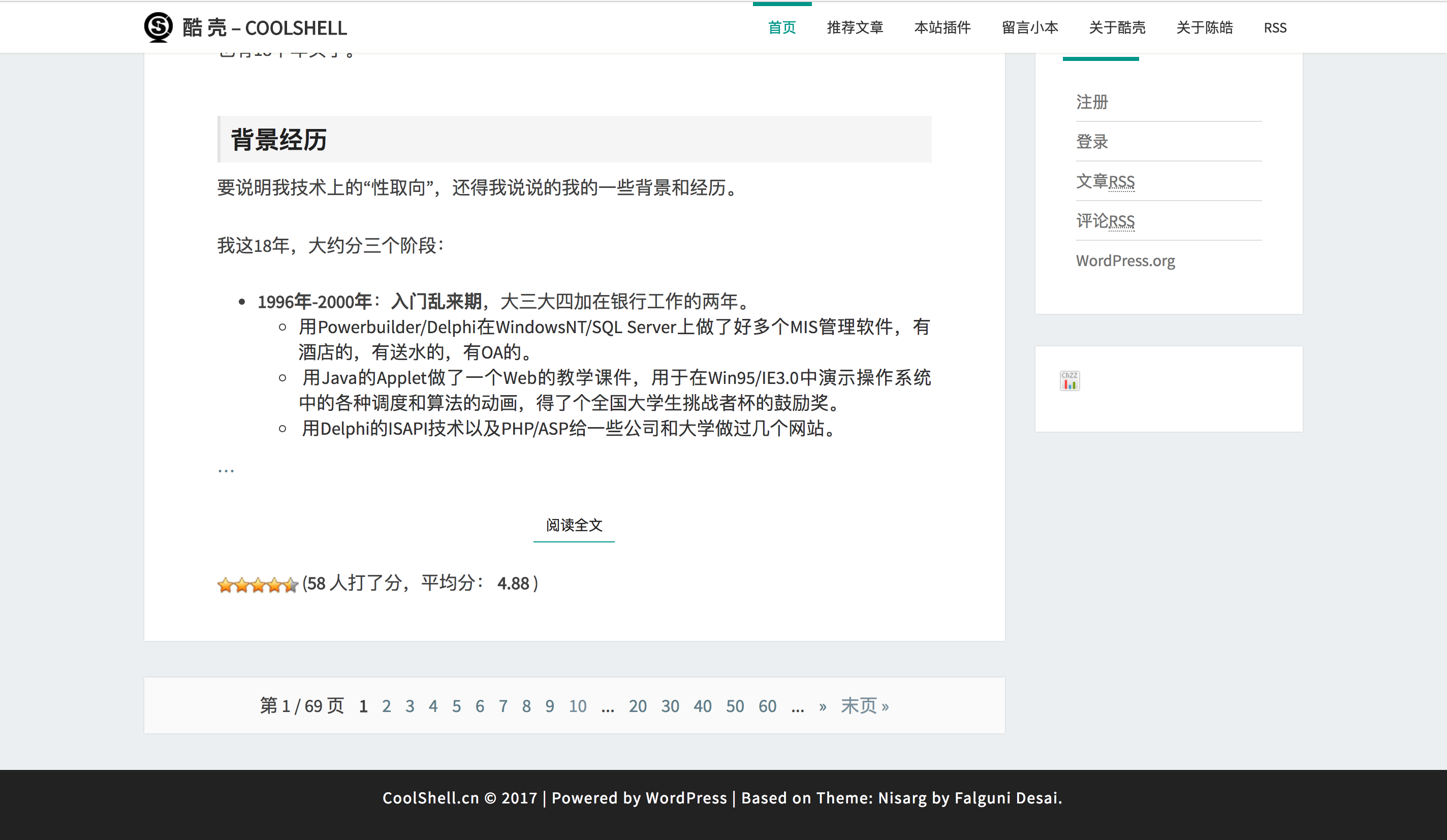
PS. 慕名已久的技术博客站点之一
主要是参考页面风格,并不是直接 copy。这一点很重要。
风格拆解
- 菜单栏:固定最顶部,nav 标签,width 100%,margin 居中。
- 左侧主要内容:article 标签,width 9/12,白底,padding 边距。
- 右侧辅助内容:aside 标签,width 3/12,白底,padding 边距。
- © 信息:固定最底部,footer 标签,width 100%,margin 居中。
PS. 使用浏览器开发者工具模式。
先确定目标,可以节省很多犹豫徘徊的时间。
风格确定之后,就可以开始写代码了。
创建 Jekyll2 工程
安装与入门,参考 Jekyll 中文版3。
首先,创建一个新的主题工程。
1
jekyll new theme
修改 Gemfile 文件,删除默认主题。
1
#gem "minima", "~> 2.0"
修改 _config.yml 文件,删除默认主题
1
#theme: minima
这样操作之后,就会出现报错,并且无法启动。
1
2
3
4
5
6
7
8
bundler install
jekyll build

Liquid Exception: Could not locate the included file 'icon-github.html'
in any of ["/Users/chenxinjie/GitHub/theme/_includes"].
Ensure it exists in one of those directories and,
if it is a symlink, does not point outside your site source.
in about.md
但这并没有任何问题,只是删除默认主题之后,缺少主题文件的报错而已。
目录结构
1
2
3
4
5
6
7
8
9
10
11
12
13
14
15
16
17
18
19
.
├── _config.yml
├── _data
|── ├── menus.yml
├── _drafts
|── ├── begin-with-the-crazy-ideas.textile
|── └── on-simplicity-in-technology.markdown
├── _includes
|   ├── footer.html
|   └── header.html
├── _layouts
|   ├── default.html
|   └── post.html
├── _posts
|   ├── 2007-10-29-why-every-programmer-should-play-nethack.textile
|   └── 2009-04-26-barcamp-boston-4-roundup.textile
├── _site
├── .jekyll-metadata
└── index.html
手动补全目录
1
2
3
_drafts:(草稿)是未发布的文章。
_includes:加载这些包含部分到你的布局或者文章中以方便重用。
_layouts:(布局)是包裹在文章外部的模板。
手动补全空白文件
1
2
3
4
_includes/icon-github.html
_layouts/post.md
_layouts/page.md
_layouts/home.md
这样,一个没有报错,可以成功启动的工程就创建好了。
1
2
3
4
5
6
7
8
FoamValue-MBP:theme chenxinjie$ jekyll build
Configuration file: /Users/chenxinjie/GitHub/theme/_config.yml
            Source: /Users/chenxinjie/GitHub/theme
       Destination: /Users/chenxinjie/GitHub/theme/_site
 Incremental build: disabled. Enable with --incremental
      Generating...
                    done in 0.178 seconds.
 Auto-regeneration: disabled. Use --watch to enable.
添加 Jekyll 插件
修改 Gemfile 文件
1
2
3
4
5
6
7
group :jekyll_plugins do
   gem "jekyll-feed", "~> 0.6"
   gem 'jekyll-paginate'
   gem 'jekyll-watch'
   gem 'jekyll-assets'
   gem 'jekyll-tagging'
end
修改 _config.yml 文件
1
2
3
4
5
6
7
8
9
paginate: 10 # 分页
paginate_path: "page:num"

tag_page_layout: tag_page
tag_page_dir: tag

gems:
  - jekyll-feed
  - jekyll-paginate
运行命令安装
1
bundler install
检查是否安装成功
1
2
3
4
5
6
7
8
9
FoamValue-MBP:theme chenxinjie$ jekyll build
Configuration file: /Users/chenxinjie/GitHub/theme/_config.yml
            Source: /Users/chenxinjie/GitHub/theme
       Destination: /Users/chenxinjie/GitHub/theme/_site
 Incremental build: disabled. Enable with --incremental
      Generating...
        Pagination: Pagination is enabled, but I couldn't find an index.html page to use as the pagination template. Skipping pagination.
                    done in 0.187 seconds.
 Auto-regeneration: disabled. Use --watch to enable.
警告不用暂时忽略。
添加 Bootstrap4 框架
Bootstrap 是个异常优秀的互联网前端框架,可能并不是所有人都喜欢哈。
反正,我这个后端开发者很喜欢。
此处,使用的是最新的 v4.0.0-alpha.6 版本(要跟上互联网的变化)。但是最新版移除了 Glyphicon Halflings 的字体图标,如果介意的话,建议使用 v3 版本。
在工程根目录下,创建 assets 目录。
1
2
3
4
5
6
7
8
9
.
├── assets
|── ├── fonts
|── ── └── fontawesome-webfont.eot
|── └── images
|── └── javascripts
|── ── └── bootstrap.min.js
├── bootstrap.min.css
...
添加 Typeahead 5
Bootstrap 的自动补全插件,用来伪装搜索功能。
添加 Jquery6
当前最新 V3.2.1 版本。
抓住重点 技术型博客主题,不考虑 IE 用户。
软件开发人员,请使用好 chrome。
添加 Fontawesome7 字体文件
这是对 Bootstrap V4 版本不支持字体图片的补充。
骨干框架
1
2
3
4
5
6
7
8
9
10
11
12
13
.
├── _layouts
|── ├── default.md
|── _includes
|── └── head.md
|── └── nav.md
|── └── footer.md
|── └── script.md
|── └── postJson.md
├── _data
|── └──menus.yml
├── index.html
...
default.md
HTML 模版,通过引用 default 模版来展现页面。
1
2
3
4
5
6
7
8
9
10
11
12
13
14
15
16
17
18
19
20
21
<!DOCTYPE html>
<html lang="en">
  {[ include head.md ]}
  <body>
  {[ include nav.md ]}
  <div class="container">
    <div class="row">
      <div class="col-md-9">
        {[ content ]]}
      </div>
      <div class="col-md-3 .visible-lg-3">
        <div class="row">
        </div>
      </div>
  </div>
  {[ include footer.md ]}
  {[ include script.md ]}
  {[ include postJson.md ]}
  {[ include analytics.md ]}
  </body>
</html>
head.md
1
2
3
4
5
6
7
8
9
10
11
<head>
  <meta charset="utf-8">
  <meta name="viewport" content="width=device-width, initial-scale=1, shrink-to-fit=no">
  <meta name="description" content="">
  <meta name="author" content="">
  <!-- <link rel="icon" href="../../favicon.ico"> -->
  <title>{[ if page.title ]}{[ page.title ]]}{[ else ]}{[ site.title ]]}{[ endif ]}</title>
  <link href="{[site.url]]}/assets/bootstrap.min.css" rel="stylesheet">
  <link href="{[site.url]]}/assets/font-awesome.min.css" rel="stylesheet">
  <link href="{[site.url]]}/assets/theme.css" rel="stylesheet">
</head>
nav.md
1
2
3
4
5
6
7
8
9
10
11
12
13
14
15
16
17
18
19
<nav class="navbar navbar-toggleable-md navbar-inverse bg-inverse fixed-top nav-style">
  <button class="navbar-toggler navbar-toggler-right" type="button" data-toggle="collapse" data-target="#navbarsExampleDefault" aria-controls="navbarsExampleDefault" aria-expanded="false" aria-label="Toggle navigation">
    <span class="navbar-toggler-icon"></span>
  </button>
  <a class="navbar-brand" href="/">{[site.web_name]]}</a>

  <div class="collapse navbar-collapse" id="navbarsExampleDefault">
    <ul class="navbar-nav mr-auto">
      {[ for menu in site.data.menus ]}
      <li class="nav-item">
        <a class="nav-link" href="{[menu.url]]}">{[menu.name]]}</a>
      </li>
      {[ endfor ]}
    </ul>
    <form class="form-inline my-2 my-lg-0">
      <input id="custom-templates" class="typeahead form-control mr-sm-2" type="text" placeholder="请输入文章名称">
    </form>
  </div>
</nav>
footer.md
1
2
3
<footer class="footer bg-inverse">
<p>foamvalue.com©Company 2017 | Powered by Jekyll | Based on Theme: Bootstrap</p>
</footer>
script.md
1
2
3
4
<script src="{[site.url]]}/assets/javascripts/jquery-3.2.1.min.js"></script>
<script src="{[site.url]]}/assets/javascripts/tether.min.js"></script>
<script src="{[site.url]]}/assets/javascripts/bootstrap.min.js"></script>
<script src="{[site.url]]}/assets/javascripts/bootstrap3-typeahead.min.js"></script>
postJson.md
模糊查询的 Javascript 实现。
1
2
3
4
5
6
7
8
9
10
11
12
13
14
15
16
17
18
19
20
21
22
23
24
25
26
27
28
29
30
31
32
33
34
35
36
37
<script>
var posts = [{[ for post in site.posts ]}{"title": "{[ post.title ]]}","url": "{[ post.url ]]}"}{[ unless forloop.last ]},{[ endunless ]}{[ endfor ]}];


var names = new Array(); //文章名字等
var urls = new Array(); //文章地址

for (var index in posts) {
    var item = posts[index];
    names.push(item.title);
    urls.push(item.url);
}

var substringMatcher = function(strs) {
  return function findMatches(q, cb) {
    var matches, substringRegex;
    matches = [];
    substrRegex = new RegExp(q, 'i');
    $.each(strs, function(i, str) {
      if (substrRegex.test(str)) {
        matches.push(str);
      }
    });

    cb(matches);
  };
};

$('#custom-templates').typeahead({
  name: 'title',
  source: substringMatcher(names),
  afterSelect: function (item) {
    window.location.href = (urls[names.indexOf(item)]);
    return item;
  }
});
</script>
menus.yml
菜单数据集合。
1
2
3
4
5
6
7
8
9
10
11
12
13
14
- name: 首页
url: /

- name: 历史文章
url: /archive

- name: 作品集锦
url: /works

- name: 关于作者
url: /about

- name: 订阅/RSS
url: /feed.xml
index.html
1
2
3
4
5
6
7
8
9
10
11
12
13
14
15
16
17
18
19
20
21
22
23
24
25
26
27
28
29
30
31
32
33
34
35
36
37
38
39
40
41
42
43
44
45
46
47
48
49
50
51
52
53
54
55
56
57
58
59
60
61
62
63
64
65
66
67
68
---
layout: default
---
{[ for post in paginator.posts ]}
<article>
<header>
<h2>{[ post.title ]]}</h2>
<div>
<i class="fa fa-calendar" aria-hidden="true"></i>
<span>{[ post.date | date: "%Y年%m月%d日" ]]}</span>
<i class="fa fa-user" aria-hidden="true"></i>
<span>{[ post.author ]]}</span>
</div>
</header>
<div>
{[ if post.description ]}{[post.description]]}{[ else ]}{[ post.excerpt ]]}{[ endif ]}
<p class="tags">
{[ for tag in post.tags ]}
<span class="label-item">{[tag]]}</span>
{[ endfor ]}
</p>
</div>
<footer>
<a href="{[ post.url ]]}" target="\_blank"><span >阅读全文 » </span></a>
</footer>
</article>
{[ endfor ]}
{[ if paginator.page ]}
<nav aria-label="Page navigation example">
<ul class="pagination">
<li>第 {[paginator.page]]} / {[paginator.total_pages]]} 页</li>
{[ if paginator.previous_page ]}
{[ if paginator.previous_page == 1 ]}
<li class="page-item"><a class="page-link" href="{[ site.url ]]}">Previous</a></li>
{[ else ]}
<li class="page-item"><a class="page-link" href="{[ site.url ]]}">First</a></li>
<li class="page-item"><a class="page-link" href="{[ site.url ]]}/page{[ paginator.previous_page ]]}">Previous</a></li>
{[ endif ]}
{[ endif ]}
{[ if paginator.total_pages > 10 ]}
{[ if paginator.previous_page > 1 ]}
<li class="page-item special">...</li>
{[ endif ]}
<li class="page-item"><a class="page-link" href="{[ site.url ]]}/page{[ paginator.total_pages | divided_by: 2 | minus : 2]]}">{[paginator.total_pages | divided_by: 2 | minus : 2]]}</a></li>
<li class="page-item"><a class="page-link" href="{[ site.url ]]}/page{[ paginator.total_pages | divided_by: 2 | minus : 1]]}">{[paginator.total_pages | divided_by: 2 | minus : 1]]}</a></li>
<li class="page-item"><a class="page-link" href="{[ site.url ]]}/page{[ paginator.total_pages | divided_by: 2 ]]}">{[paginator.total_pages | divided_by: 2]]}</a></li>
<li class="page-item"><a class="page-link" href="{[ site.url ]]}/page{[ paginator.total_pages | divided_by: 2 ]]}">{[paginator.total_pages | divided_by: 2 | plus : 1]]}</a></li>
<li class="page-item"><a class="page-link" href="{[ site.url ]]}/page{[ paginator.total_pages | divided_by: 2 ]]}">{[paginator.total_pages | divided_by: 2 | plus : 2]]}</a></li>
<li class="page-item special">...</li>
{[ else ]}
{[ for page_num in paginator.previous_page ]}
<li class="page-item"><a class="page-link" href="{[ site.url ]]}/page{[ paginator.page_num ]]}">{[page_num]]}</a></li>
{[ endfor ]}
{[ endif ]}
{[ if paginator.next_page ]}
<li class="page-item"><a class="page-link" href="{[ site.url ]]}/page{[ paginator.next_page ]]}">Next</a></li>
<li class="page-item"><a class="page-link" href="{[ site.url ]]}/page{[ paginator.total_pages ]]}">Last</a></li>
{[ endif ]}
</ul>
</nav>
{[ endif ]}
…
使用了[] 替换了 markdown 语法,
省略部分文件,
最终效果的代码,
以 Github 为准。
最终效果


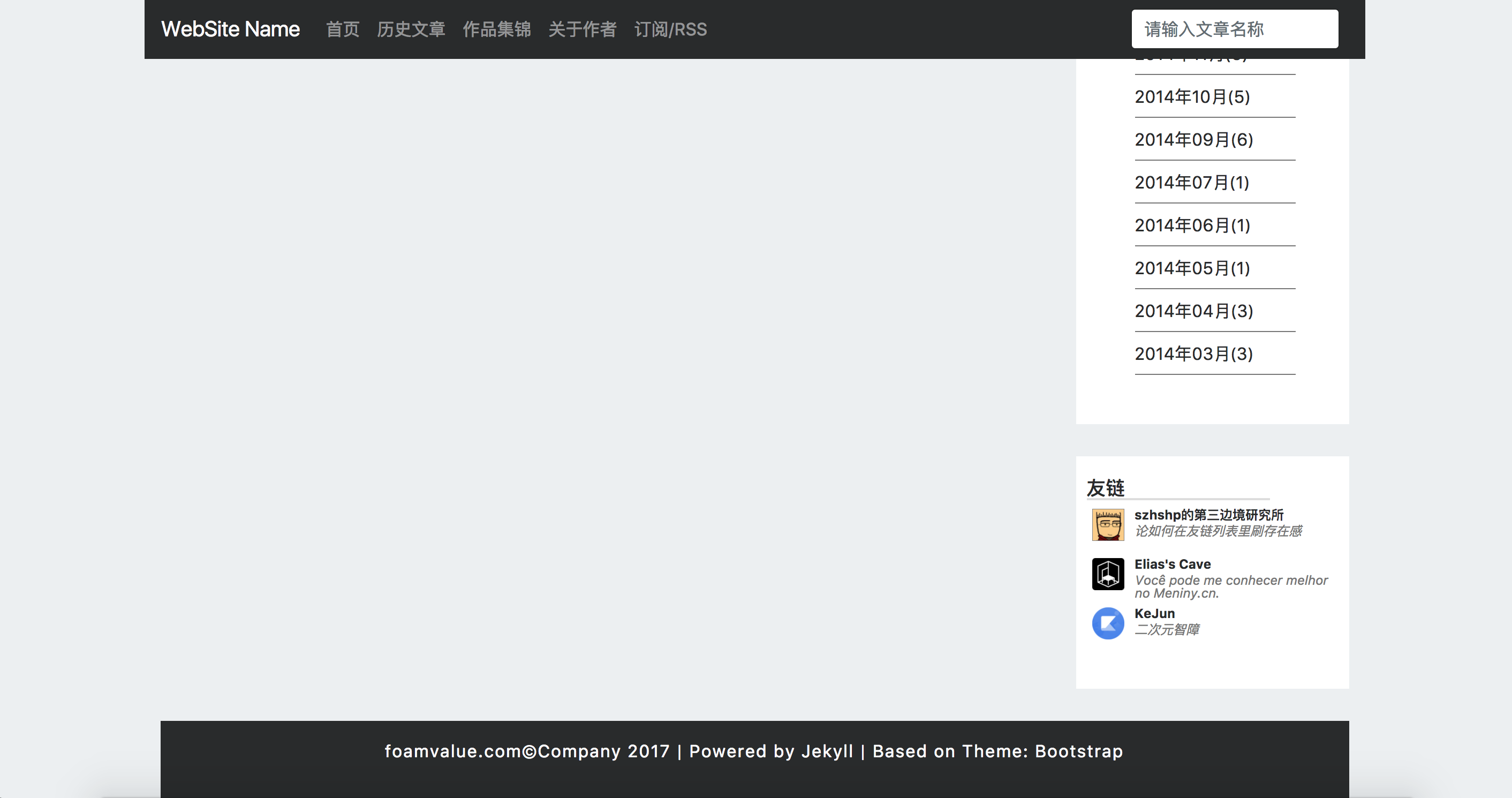
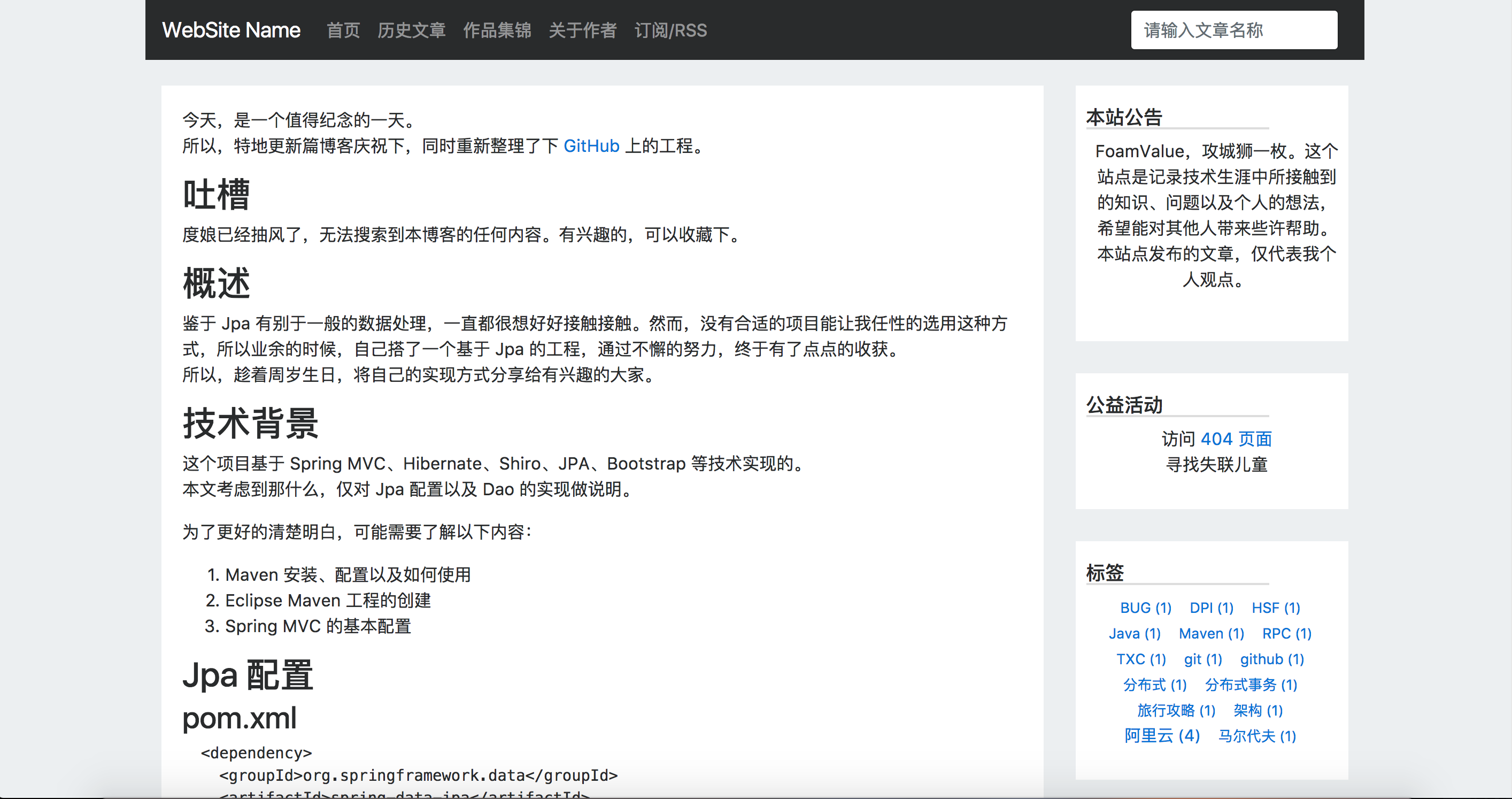
结尾
本文内容较为简单。
通篇主要讲主题的如何实现,以及贴代码。
最后,需要注意本主题还不是稳定版本哦。
但是,欢迎提交 Issues。
但不一定及时处理。
主题使用 MIT License,请随便使用。
代码地址 Github